 AI
AI Our Gomoku in HD, ROM untouched: an AI makes the HD pack itself
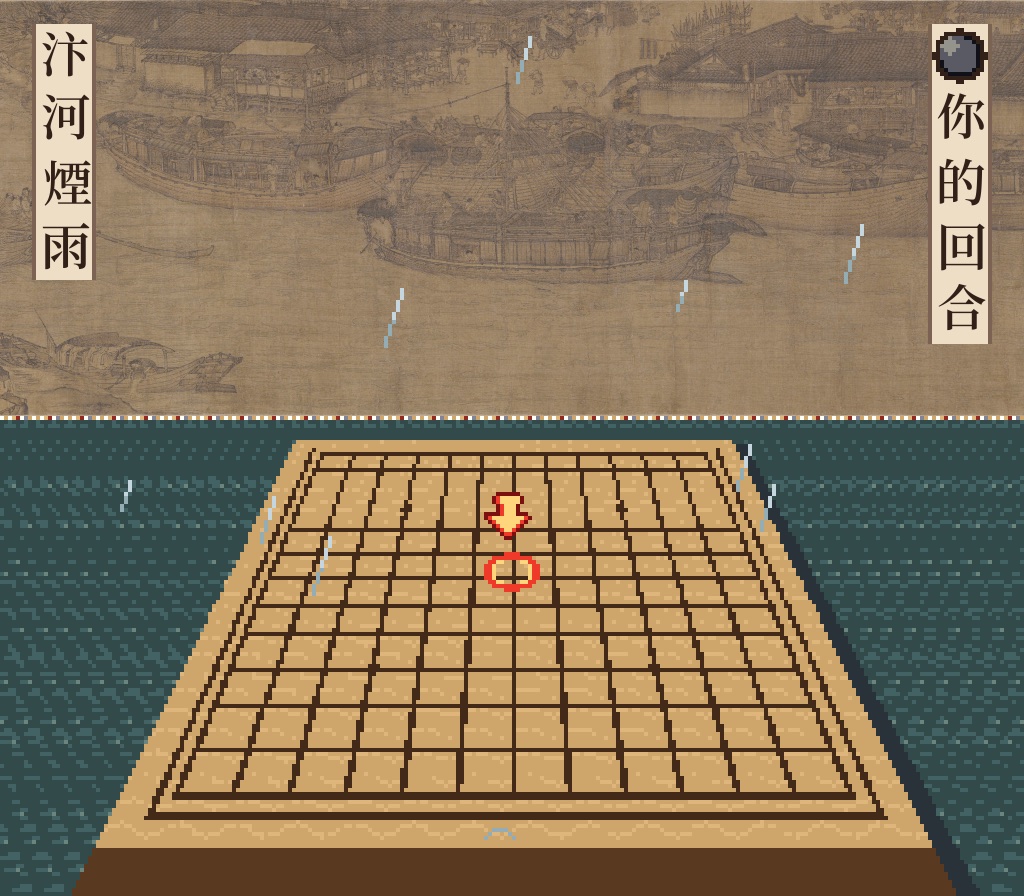
In the previous post an AI made Bianhe, a 2.5D Gomoku, from one sentence. The Super Famicom screen is 256×224: the 900-year-old scroll is squeezed into 104 pixels of height, and the captions use a 12-pixel bitmap font.
The player now supports HD packs. The ROM is not changed by a single byte; tiles and text that the player recognises on screen are drawn from the pack’s high-resolution pictures instead. This time we wanted to know: given only the game’s ROM, can the AI make the pack itself?
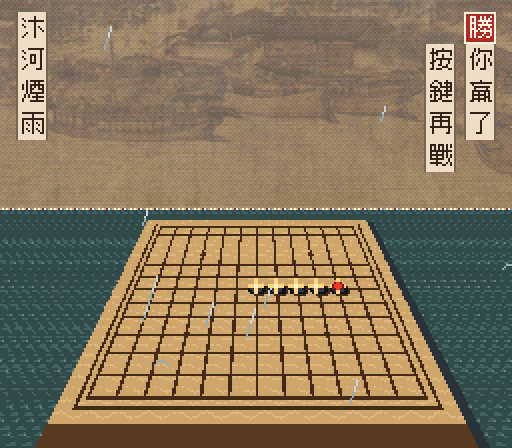
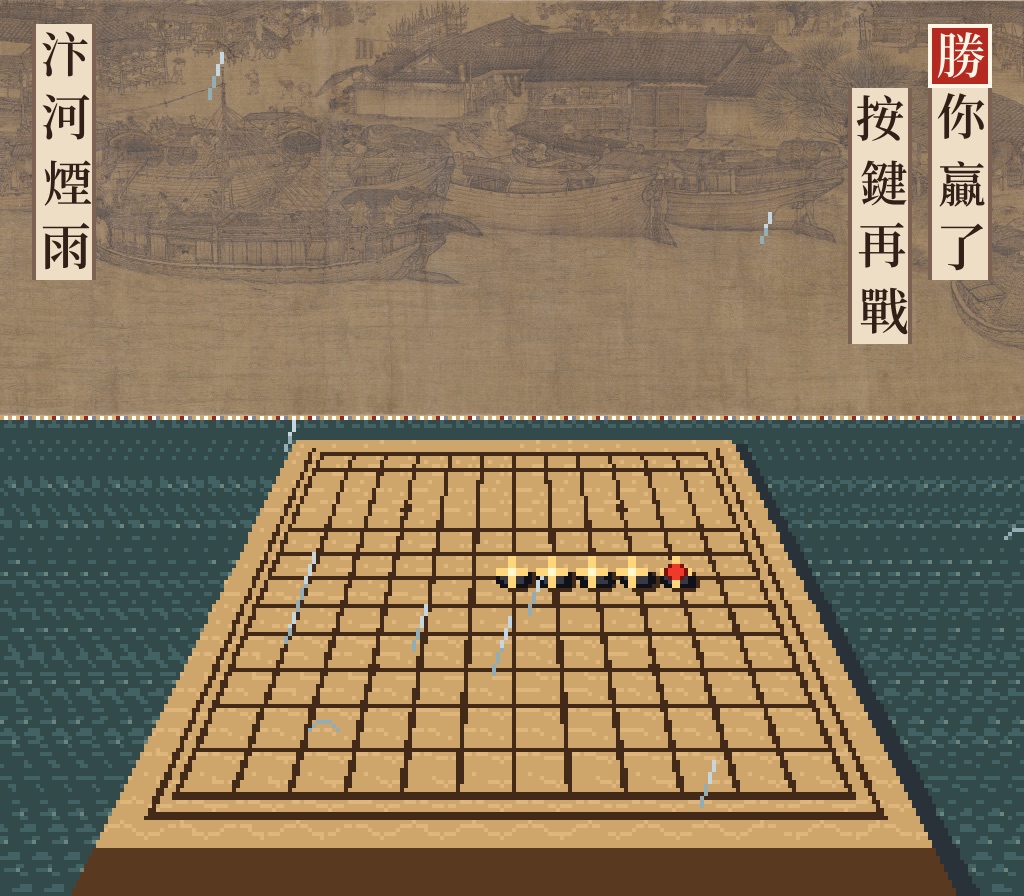
Three steps
1. Make an empty folder, put your ROM in it and install the skills:
mkdir bianhe-hd && cd bianhe-hd
cp ~/games/bianhe.sfc .
npx https://aixsfc.app/skill/aixsfc.tgz
The installer adds three Claude Code skills (sfc-hd is the one that makes HD packs) and the MCP tools: an
emulator, memory reading and writing, screenshots.
2. Start claude and say one paragraph (we wrote it in Chinese; this is a translation):
bianhe.sfc is a Gomoku game I made myself. Please use sfc-hd to make me an HD pack: resample the scrolling Qingming scroll at the top from the high-resolution original on Wikimedia Commons (public domain); redraw the Chinese text on screen with an open-licence font (e.g. Noto Serif TC). Don't ask me anything along the way; you choose the scale. Zip it when done and write a report of the process.
We added nothing after that. Normally sfc-hd first asks how to enhance the pictures (an AI upscaler on your
computer, an AI redraw, your own art) and which font to use for the text. We answered all of that up front, so it
never stopped.
3. Play: 14 minutes later it handed back bianhe-hd-pack.zip (7.8 MB). Open
aixsfc.app/player, load the game, and choose HD → Load HD pack (.zip)… in the toolbar. That is the
right-hand screen above.
What it did
Understanding the screen first
It ran the game in the emulator, saved a state, and read video memory, palettes and PPU registers out of it. Three findings:
- The screen is split at scanline 105: an ordinary background (Mode 1) above, the perspective board (Mode 7) below.
- The scroll is a background layer, streamed into video memory one column at a time through a ring of 64 columns.
- The captions and “your turn” are not background text: they are 16×16 sprites.
A pack’s text recognition only finds characters on a background layer, aligned to the 8×8 grid, so it decided to replace each character as ordinary tiles instead. The result is the same, and it worked that out on its own.
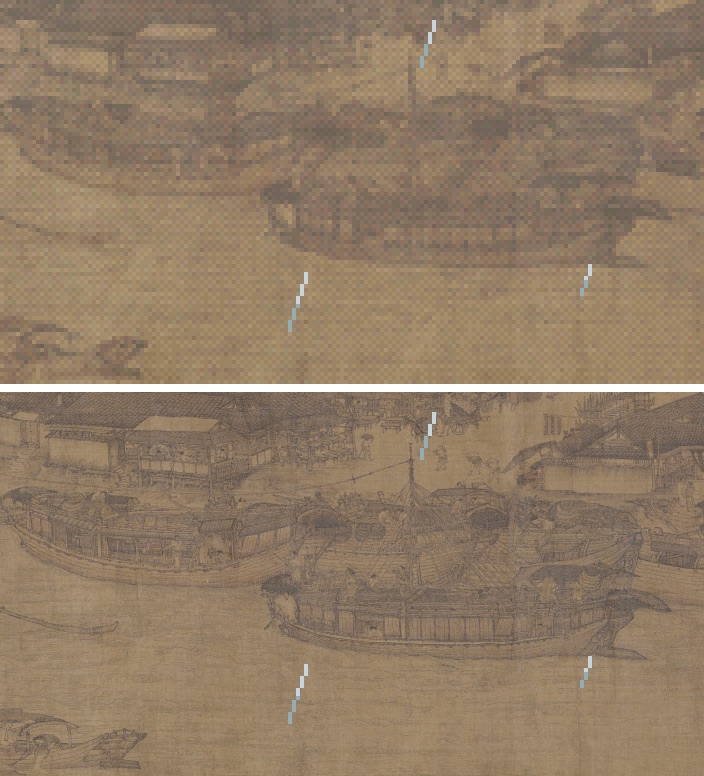
The scroll: from the ROM to the museum scan
- Find the whole scroll in the ROM. The tiles start at
$40000, 13 per column, 263 columns: 2104×104 pixels. It checked the extracted picture against the 429 tiles on screen: all 429 identical. - Download the original. The full scan on Wikimedia Commons is a 38414×1800-pixel, 19 MB JPEG.
- Line them up. The game’s scroll is the original cropped, shrunk and recoloured, so first it had to find how one maps onto the other. A correlation search at low resolution, then fine tuning, gave one linear map: game x → original X = 1913 + 16.94x. Searching each 64-pixel stretch on its own gave an offset of 0 everywhere, so one map fits the whole scroll.
- Resample. Each HD pixel is the average of the roughly 4.2×4.2 original pixels it covers: an 8416×416 scroll.
- Match the colours. The scan has the museum’s cool grey; the game has a warmer silk tone. A least-squares colour transform keeps the HD scroll in the game’s colours, so pressing H doesn’t make the colours jump.
- Cut into tiles. 3419 tiles. Each key is a hash of the original tile’s pixels plus its palette, pointing at the 32×32 block in the same place on the HD scroll.
The text: a serif font
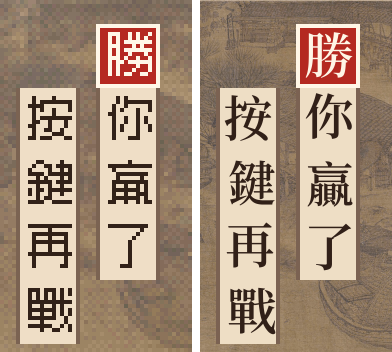
- From Google Fonts it downloaded only the 29 characters the game uses (Noto Serif TC, SIL OFL), plus the red seal characters “win” and “draw”.
- This computer had no font renderer at hand, so it wrote its own TrueType parser and anti-aliased rasteriser.
- Each character is fitted to the ink of the original bitmap: it searched scales from 0.86 to 1.06 and offsets of ±1 pixel for the best overlap.
- It tried weights 500, 600, 700 and 900, and chose 600, the closest to the original strokes.
- The panels’ borders and background keep their original pixels; only the characters change. 124 sprite tiles in all.
Working within limited permissions
This Claude Code session was allowed to read and write files, use the web, and run node, python3 and curl,
nothing else. To decode the JPEG it first reached for macOS sips or npm install, but both needed the user’s
approval, and the instructions said not to ask.
So it downloaded the jpeg-js package from the npm registry with curl, checked it against the SHA-1 the registry
publishes, and unpacked it with a small program of its own. The font renderer was written for the same reason.
Playing with the pack
- The HD menu in the toolbar has five choices: off, on, load a folder, load a .zip, remove. On a phone a .zip is the easiest.
- Once loaded, the pack is kept in the browser for that ROM. The next time you open the game it is applied automatically, and on/off is remembered.
- Press H at any time to switch it on and off and compare.
- As the scroll moves, every newly revealed column turns HD too. The pack matches the tiles on screen, not ROM addresses, so tiles streamed in are recognised like any other.
A bug we found while playing
The first time we applied the pack in the player, the board in the lower half was covered in vertical stripes. The cause was in the player: this game switches from Mode 1 to Mode 7 halfway down the same frame, and the Mode 7 scanlines didn’t clear the “which tile drew this pixel” record left by the scanline above, so the board was replaced with tiles from the scroll.
The fix was one line, with a test, and the player no longer does this. That alone made the demo worthwhile: it took a game that really switches modes mid-screen to run into it.
Not done yet
- The rightmost ~64 pixels don’t line up well with the Commons scan. In its report the AI guessed that the game used another scan, or that the seam had been edited. From the previous post’s making-of, the likelier reason is that the scroll’s ends were cross-faded so it can loop forever, so this stretch is blended with the beginning. The HD scroll is still continuous there, but its detail isn’t exactly the original pixels.
- The board, stones, rain and cursor keep their pixels: the board is Mode 7, which the format doesn’t support, and the other sprites were outside this job.
Numbers
| Instructions to the AI | 1 paragraph (4 sentences) |
| Total time | about 14 minutes |
| Tool calls | 104 (Claude Opus 5.5, 94 replies) |
| AI output tokens | 69,082 |
| Total tokens processed | about 8 million (mostly cache reads) |
| Estimated cost | about US$4 (at Anthropic API list prices, November 2026; subscriptions are billed differently) |
| The pack | 4×, 3543 tiles (3419 scroll, 124 text), 7.8 MB zipped |
What’s in a pack
A pack is a folder (or a zip) with one manifest.json and a few PNGs. The manifest only lists which hash goes with
which block of which picture, so:
- The pack holds nothing from the ROM; the original pixels appear only as hashes.
- The player runs no code from a pack; a pack is data only.
- Matching works on the tiles on screen, so the player doesn’t need to know which game it is.
This pack’s scroll comes from a public-domain painting, the font is SIL OFL, and the game is our own, so it can be shared. A pack made from a commercial game is a derivative of that game: keep it for your own use, and never share a zip that holds a ROM together with its pack.
To try it yourself, run npx https://aixsfc.app/skill/aixsfc.tgz in an empty folder and start claude; see the
home page.
Sources and licences
- Painting: Zhang Zeduan, Along the River During the Qingming Festival, 12th century, public domain; scan from
Wikimedia Commons,
File:Alongtheriver QingMing.jpg. - Font: Noto Serif TC, Google / Adobe, SIL Open Font License 1.1.
- The game Bianhe: see the previous post. Not affiliated with or endorsed by Nintendo.